



The International Executive MBA is designed to solve the most critical challenges faced by leaders like you in a globalised and constantly changing business env
 Blog
Blog
10 de December de 2025
Power BI: what it is, what it is used for, and how to get the most out of it in your company
Marketing Specialist at ENAE Business School, where he is part of the team responsible for planning, producing and optimising digital content for the enae.es and enae.com websites, as well as for the school’s various social media channels. Using the Drupal CMS, he manages the publication and updating of pages and articles, ensuring brand consistency, content quality and a positive user experience.
He specialises in SEO and performance marketing, defining and implementing organic content strategies with the support of tools such as Sistrix and Google Search Console to improve search rankings and drive qualified traffic to master’s programmes and executive courses. Furthermore, he designs, configures and optimises online advertising campaigns on Meta, LinkedIn, TikTok and Google Ads, aligning targeting, messaging and objectives with student recruitment. His work contributes to ENAE’s organic and paid growth and to strengthening its position as a leading business school both nationally and internationally.
Sumario:
Below, we will explain what Power BI is, the benefits it can bring to your company, and how you can implement this software to optimize your processes and improve strategic decision-making.
Power BI has become one of the key tools for transforming data into decisions. In a context where the global business intelligence market already exceeds $30 billion and continues to grow at double-digit rates, having a powerful, flexible, and easy-to-use solution is no longer optional—it is strategic.
In this guide, you will find a comprehensive and practical overview of Power BI: what it is, how it works, what benefits it brings, and how to get started step by step, whether you are a manager, analyst, marketing professional, or financial manager.

What is Power BI and why is it key to today's data analytics?
Power BI is Microsoft's business intelligence platform that allows you to connect data from multiple sources, model it, and visualize it in interactive reports and dashboards accessible from any device.
In practice, Power BI helps you to:
- Unify scattered data (ERP, CRM, Excel, databases, marketing tools, etc.).
- Create clear and intuitive visualizations.
- Share dashboards in real time with your team or management.
- Make decisions based on data rather than intuition.
The context also plays in its favor: the global business intelligence market was valued at around $31.98 billion in 2024 and is expected to reach more than $63 billion in 2032, driven by the need for data-driven decisions across all sectors.
In addition, Microsoft remains one of the leaders in the Gartner Magic Quadrant for Analytics and BI Platforms 2025, with Power BI as the centerpiece of its cloud analytics offering.
Main components of Power BI
To fully understand how to get the most out of it, it is helpful to know its key components.
Power BI Desktop
This is the (free) desktop application where most of the work is done:
- Connecting to data sources.
- Transforming and cleaning data (Power Query).
- Data modeling (relationships, calculated columns, DAX measures).
- Designing interactive reports.
Analysts typically work in Power BI Desktop and, once the report is ready, publish it to the online service.
Power BI Service (Power BI in the cloud)
This is the online version of Power BI, available as a service in the Microsoft cloud:
- It allows you to publish, share, and consume reports and dashboards.
- It facilitates the scheduling of automatic data updates.
- It includes collaboration, commenting, and workspace features.
- It integrates AI and Copilot capabilities to generate analysis and explanations more quickly.
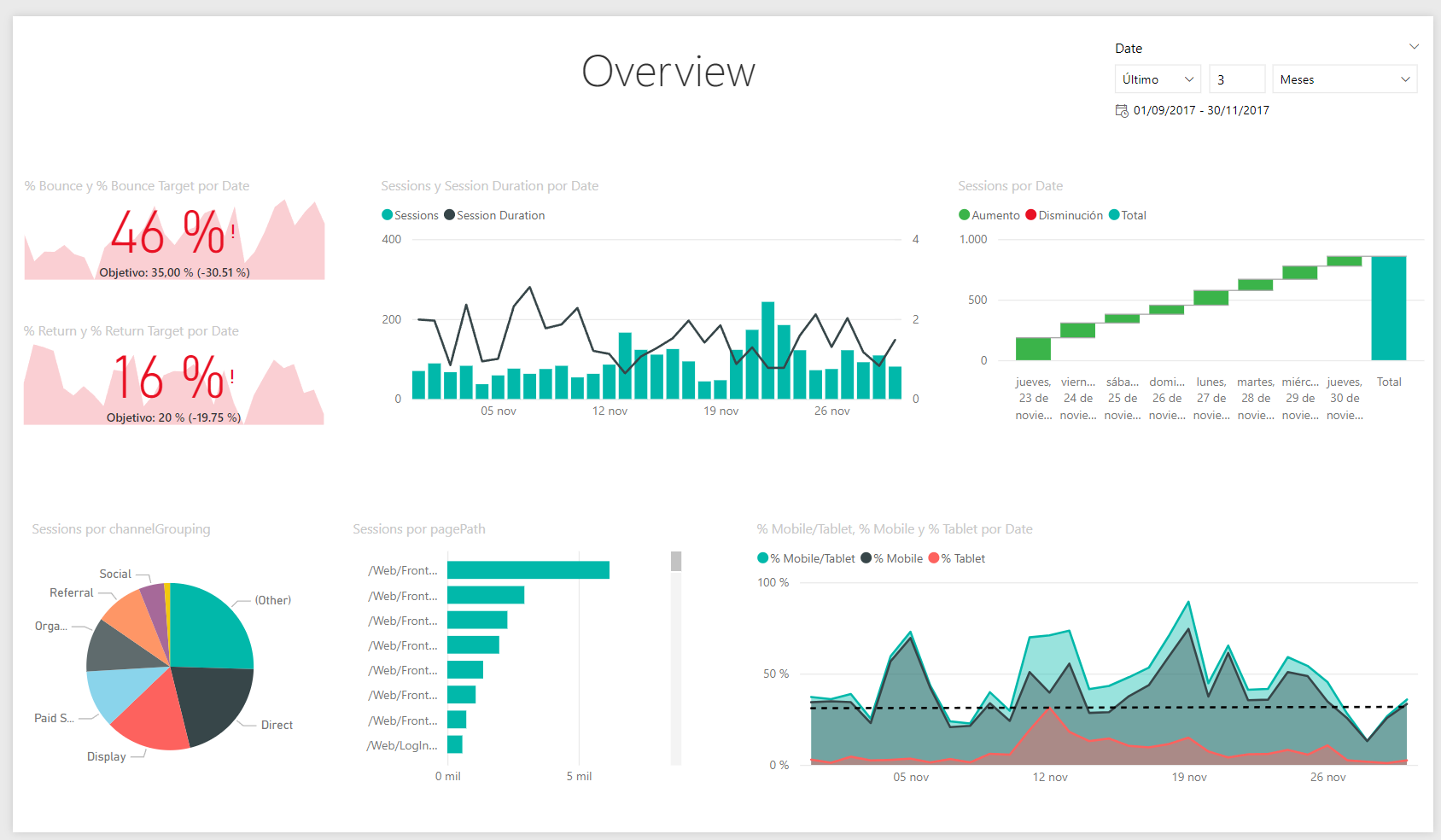
Power BI Mobile
Power BI mobile apps allow you to view dashboards and reports from your mobile phone or tablet, which is especially useful for management committees, sales teams, or operations managers who need to have key indicators at their fingertips.
Other elements of the Power BI ecosystem
- Power BI Gateway: securely connect your local (on-premise) data to the cloud.
- Power BI Report Builder: for paginated, highly detailed reports intended for printing or PDFs.
- Integrations with Excel, Teams, SharePoint, Azure, and other tools in the Microsoft ecosystem.
Benefits of Power BI for organizations
Implementing Power BI well is not just about “making pretty graphs”; it has a direct impact on how the company makes decisions. Among its benefits are:
- Democratization of data
- Allows business profiles to access data and perform basic analysis without constantly relying on IT.
- The self-service BI market is growing strongly: it is estimated to grow from around $11 billion in 2024 to $12.52 billion in 2025, with an annual rate of 13.8%.
- Better real-time business insight
- Dashboards with scheduled updates.
- Automatic alerts when an indicator deviates from the target.
- Integration with existing tools
- Excel, Azure, Dynamics 365, SQL databases, cloud services, marketing and sales tools, etc.
- Scalability and competitive cost
- Per-user licensing model and premium cloud capabilities, very attractive compared to traditional BI platforms.
- Data security and governance
- Role-based access control, integration with Azure Active Directory, and row-level security (RLS) policies.
Power BI use cases in different sectors
Power BI is already used in a multitude of industries and functional areas, with documented cases in healthcare, energy, finance, manufacturing, and education.
Some common examples:
- General management and strategy
- Global dashboards with financial, commercial, and operational KPIs.
- Monitoring of strategic objectives and OKRs.
- Marketing and sales
- Analysis of conversion funnels and campaign performance.
- Integration of CRM data, marketing automation, and web analytics.
- Identification of higher-value customer segments.
- Finance and management control
- Profitability analysis by business line, region, or customer.
- Budgets vs. actuals and forecasting integrated with AI models.
- Operations and logistics
- Monitoring of times, stock, turnover, and SLAs.
- Optimization of routes, suppliers, and service levels.
- Regulated sectors (health, energy, banking)
- Regulatory reporting and dashboards for risk committees.
- Analysis of clinical or energy data to improve efficiency and service quality.
Practical guide: how to get started with Power BI step by step

If your organization is still in the early stages, a well-planned implementation can make the difference between “just another dashboard” and a true data-driven cultural change.
1. Define business objectives and KPIs
Before opening Power BI, answer these questions:
- What decisions do we want to improve?
- What indicators do we need to make those decisions?
- Who will use the reports and dashboards?
Define a prioritized set of KPIs (no more than 10–15 at the beginning) and align it with the company's strategy.
2. Identify and connect data sources
- List all relevant sources: ERP, CRM, Excel, marketing tools, databases, etc.
- Assess data quality (duplicates, null values, inconsistencies).
- Connect Power BI to these sources using native connectors or through Power BI Gateway if the data is on-premise.
3. Model the data robustly
A good data model is at the heart of any Power BI project:
- Define dimension tables (customers, products, dates, etc.) and facts (sales, orders, leads, etc.).
- Create clear relationships and avoid unnecessarily complex models.
- Use DAX to create key measures (net sales, margin, conversion, etc.).
4. Design reports and dashboards that are easy to understand
This is where the visual aspect comes into play, but always in the service of analysis:
- Use simple charts (bars, lines, maps, cards) rather than overloaded visualizations.
- Place key KPIs at the top (“above the fold”).
- Group information into logical blocks: overview, commercial details, financial details, etc.
- Ensure a color palette consistent with the corporate identity.
5. Publish, share, and govern
Once the reports are designed:
- Publish from Power BI Desktop to the online service.
- Create workspaces by area or project.
- Set permissions by role (management, middle management, analysts).
- Configure automatic data updates.
- Document the model and KPIs (metrics dictionary).
Best practices with Power BI and common mistakes
Recommended best practices
- Start with a specific, high-impact use case
- For example, the sales dashboard or monthly financial report.
- Create a reusable corporate data model
- Avoid having 20 different versions of the “sales report.”
- Train business users
- Power BI shines when end users know how to do basic filtering, segmentation, and analysis on their own.
- Establish data and report governance
- Define who can create, modify, and publish content.
- Measure the impact
- Time savings in report preparation, faster decision-making, better alignment between areas, etc.
Common mistakes to avoid
- Creating reports directly from Excel without properly modeling the data.
- Including too many charts on a single page.
- Not documenting metrics (each area ends up measuring “sales” differently).
- Relying on a single “Power BI expert” without training the rest.
- Not reviewing data quality before “dressing it up” with visualizations.
Current trends: Power BI, AI, and the future of Business Intelligence
The evolution of Power BI is closely linked to modern BI trends:
- Integration of AI and machine learning into dashboards
- It is estimated that by 2024, more than 65% of new BI platform implementations will incorporate AI and ML capabilities for predictive analytics and automatic insight generation.
- Self-service BI as standard
- More and more organizations are giving their business teams direct access to tools such as Power BI so they can explore data and create their own reports.
- Advanced use cases
- Recent studies show the use of Power BI to optimize everything from the management of renewable energy microgrids to clinical reporting in hospitals, with a direct impact on operational efficiency and service quality.
- Greater integration with collaborative tools
- Insertion of Power BI reports into Teams, SharePoint, and business applications, making analysis a natural part of daily work.
In short, Power BI is not just a reporting tool, but a key enabler in the transition to truly data-driven organizations.
Frequently asked questions about Power BI (FAQ)
1. What exactly is Power BI?
Power BI is Microsoft's business intelligence platform that allows you to connect, transform, and visualize data from multiple sources in interactive reports and dashboards accessible from the cloud and mobile devices.
2. What is Power BI used for in a company?
Power BI is used to unify scattered data, create clear dashboards, and share information in real time, making it easier for managers and business teams to make quick decisions based on objective indicators, not intuition.
3. What types of Power BI are there?
The main components are Power BI Desktop (report design and modeling), Power BI Service (cloud publishing and collaboration), Power BI Mobile (access from mobile phones and tablets), and Power BI Gateway, which securely connects local data to the cloud.
4. Do I need to know how to program to use Power BI?
It is not essential. Many basic analyses can be performed with a graphical interface. However, to get the most out of Power BI, it is advisable to understand data modeling concepts and the DAX language to create more advanced measures and calculations.
5. What is the difference between Power BI and Excel?
Excel is an excellent tool for individual or small-scale analysis, while Power BI is designed for corporate data models, interactive dashboards, and cloud collaboration, with better performance and data visualization and governance capabilities.
6. How do I get started with Power BI in my organization?
The best approach is to start a pilot project with a high-impact use case (e.g., sales dashboard), define clear KPIs, create a robust data model, design simple reports, and train an initial group of business users to act as internal ambassadors.
Masters relacionados


Agri-food is a strategic sector for both the national and international economies.



A company or organization that anticipates, identifies needs and threats, foresees, and makes strategic and operational decisions based on Comprehensive Risk Management



In ENAE Business School's Official Master in Logistics and Operations Management program, you will learn how to analyse the performance of a company's operation


The Master in International Trade, E-commerce and AI Concentration is designed to prepare professionals to lead international business operations in a global, d
Artículos recomendados
También te podría interesar leer

An international trade center supports companies and professionals involved in cross-border business. Depending on the country and institution, its activities may include export promotion, market intelligence, regulatory guidance, logistics support…

There is a ceiling most professionals hit somewhere in their thirties. The technical skills that earned them their first promotion stop being enough, and the gap between where they are and where they want to be starts to feel less like a ladder and…

The volume of data any organisation handles today, the speed at which new threats emerge and growing regulatory complexity have outpaced traditional manual approaches. That is precisely where AI-driven risk management stops being a technology…
